Discord Backoffice for Subscription Management
The Backoffice is your command center for managing a paid Discord server. It is an automated infrastructure created by BotSubscription that centralizes monitoring, member management, and support logs directly within your Discord server.
Instead of switching between multiple dashboards, you can track revenue, monitor access changes, and handle support requests in real-time through dedicated, admin-only channels. This allows you to stay focused on your community while the bot handles the technical heavy lifting.
Overview of Backoffice Channels
When you add BotSubscription to your server, it automatically creates a BotSubscription • Backoffice category. These channels are restricted to admins by default to ensure privacy for sensitive transaction and member data.
Pro-tip: You can fine-tune permissions for individual channels using Discord's built-in tools. This allows you to, for example, grant support agents access to #support-log and #support-threads while keeping sensitive #payments data restricted to owners.
| Channel | Purpose |
|---|---|
#payments | Real-time logs of new subscription payments and access granted events |
#notifications | Access removal events and other critical member notifications |
#support-log | Comprehensive logs of all support ticket activity |
#support-threads | Active support conversation threads for direct member assistance |
Memberships: N | A dynamic voice channel showing your current active member count |
Payment Notifications
The #payments channel is your central hub for tracking revenue. It logs every transaction with comprehensive details, allowing you to monitor your growth without leaving Discord.
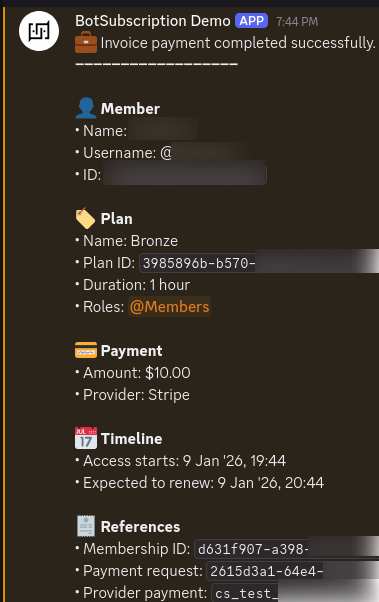
Each payment notification includes:
- Member: Discord username, display name, and user ID
- Plan: Name, plan ID, duration, price, and assigned role
- Payment: Amount, payment provider (Stripe, PayPal, crypto)
- Timeline: Join date and expected renewal date
- References: Membership ID, payment request ID, and provider transaction ID
Access Removal Notifications
The #notifications channel keeps you informed when members lose access to your paid Discord server. This helps you understand churn and identify when manual intervention might be needed.
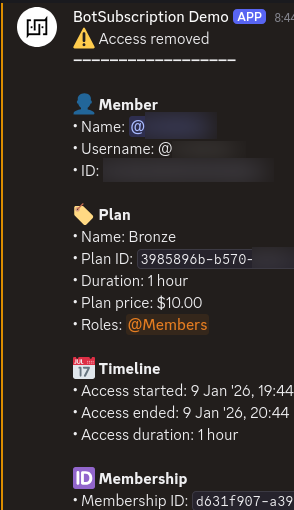
Each access removal notification includes:
- Member details: Username, ID, and moderator (for manual removals)
- Plan info: Name, duration, and price
- Duration: Access start date, end date, and total access duration
Best Practices
Restrict Access
Keep backoffice channels visible only to admins and trusted moderators. The bot creates them with restricted permissions by default, but you should periodically verify these settings in Discord.
Use Notifications for Engagement
When you see a new payment in #payments, it's a great opportunity to send a personalized welcome message to the new member, increasing retention and satisfaction.
Monitor Support Logs
The #support-log and #support-threads channels are vital for maintaining a high level of service. Ensure your support team has access to these channels to respond quickly to member inquiries.
If you accidentally delete a backoffice channel, you can recreate it or re-link it through your BotSubscription dashboard settings.
Next Steps
Last updated: