Automated AI Support & Knowledge Base
BotSubscription offers a powerful advantage that sets it apart from almost every other platform: a fully integrated AI Assistant that handles your customer support 24/7.
Instead of hiring support staff or answering the same questions yourself day and night, you can let your subscription bot handle inquiries automatically on both Telegram and Discord.
- Instant Answers: Members get immediate help, even while you sleep.
- Guided Responses: The AI uses your Knowledge Base and instructions to provide answers that align with your policies.
- Available Everywhere: Bring the same powerful automated support to both your Telegram and Discord communities.
How it works
The AI Assistant isn't just a generic chatbot—it's a specialized support agent trained on your business. You build a Knowledge Base by adding FAQs, and the AI uses that information to answer member questions intelligently.
Prerequisites
Before you start, make sure:
- You can open your bot's Settings menu (
/settings) and access AI Assistant. - AI Assistant is an optional add-on (see guide). If you install it, AI usage is billed separately from your main plan and appears on your monthly invoice. If you don't install it, you won't be charged for AI.
Set up the AI Assistant and add a Knowledge Base
Step 1: Open AI Assistant in Settings
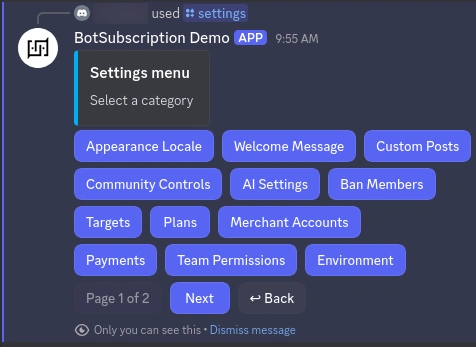
Open your bot's Settings (/settings), then select AI Assistant.
Step 2: Add FAQ entries to the Knowledge Base
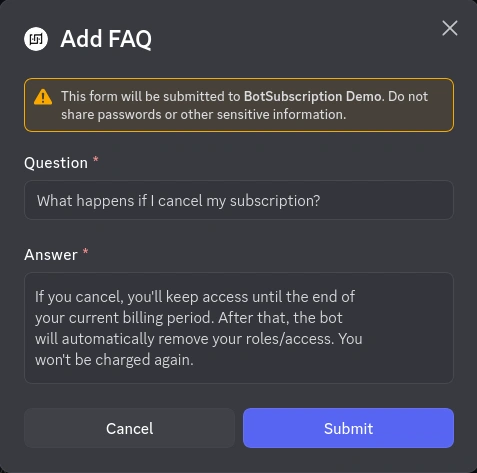
Add FAQ-style entries that match what members actually ask. Each entry should include a question (as a member would type it) and your preferred answer (tone, policies, and any links you want them to see).
Try this example to get started:
Question:
What happens if I cancel my subscription?Answer:
If you cancel, you'll keep access until the end of your current billing period. After that, the bot will automatically remove your roles/access. You won't be charged again.
Step 3: Review what the AI will use
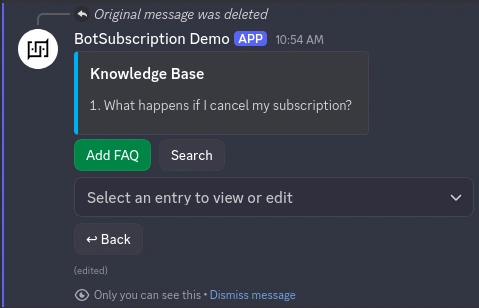
After you add FAQ entries, review your Knowledge Base and remove anything outdated so the AI doesn't repeat old policies.
Configure how AI Assistant responds
Step 4: Turn AI Assistant on for member support
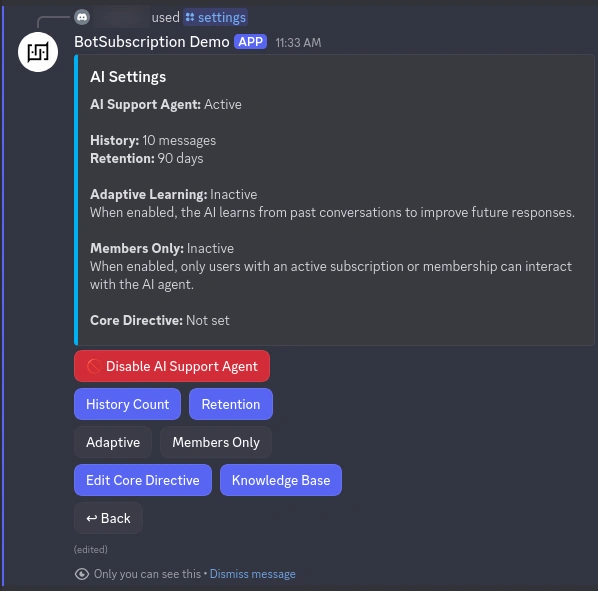
In the AI Assistant screen, enable the AI so it can respond to member questions when you're not replying manually.
AI Capabilities
The AI Assistant is more than just a chatbot—it has direct access to your project's data. This allows it to provide personalized answers and take action.
The AI can automatically:
- Check Membership Status: It knows if a user is a current member, when their plan expires, and if auto-renewal is on.
- Explain Pricing & Plans: It can look up your active subscription plans and details to help users choose the right option.
- Send Action Buttons: It can generate clickable buttons for payment links or subscription flows directly in the chat.
- Manage Tickets: It can close or resolve the support ticket once the user's issue is solved.
You don't need to configure these capabilities—the AI uses them intelligently when needed.
Fine-tune AI behavior (Core Directive)
BotSubscription supports an AI configuration field called Core Directive.
- Core Directive for AI Assistant: a "master instruction" that sets tone, boundaries, and how the AI should behave.
If you see this field in your AI settings, keep it short and specific. Use consistent wording that matches your community rules and subscription plan benefits.
Best practices for your Core Directive
A good Core Directive helps the AI understand who it is and how it should talk. Think of it as the "job description" for your bot.
- Define the Persona: Tell the AI who it is (e.g., "You are a helpful support agent for the [Your Community Name] Discord server.").
- Set the Tone: Specify if it should be professional, friendly, casual, or strict (e.g., "Be polite but concise." or "Use emojis and a friendly tone.").
- Set Boundaries: Explicitly state what it should not do (e.g., "Do not offer financial advice." or "Never promise refunds outside of the official policy.").
- Provide Context: Briefly explain what your business does so the AI has context for generic questions.
Example Directive:
"You are the support assistant for the Alpha Trading signal group. Be professional, direct, and helpful. Only answer questions related to subscriptions, access, and signal alerts. If a user asks about partnership proposals or specific account issues, ask them to wait for a human admin to review their ticket. Never give investment advice."

See it in action (Multilingual Support)
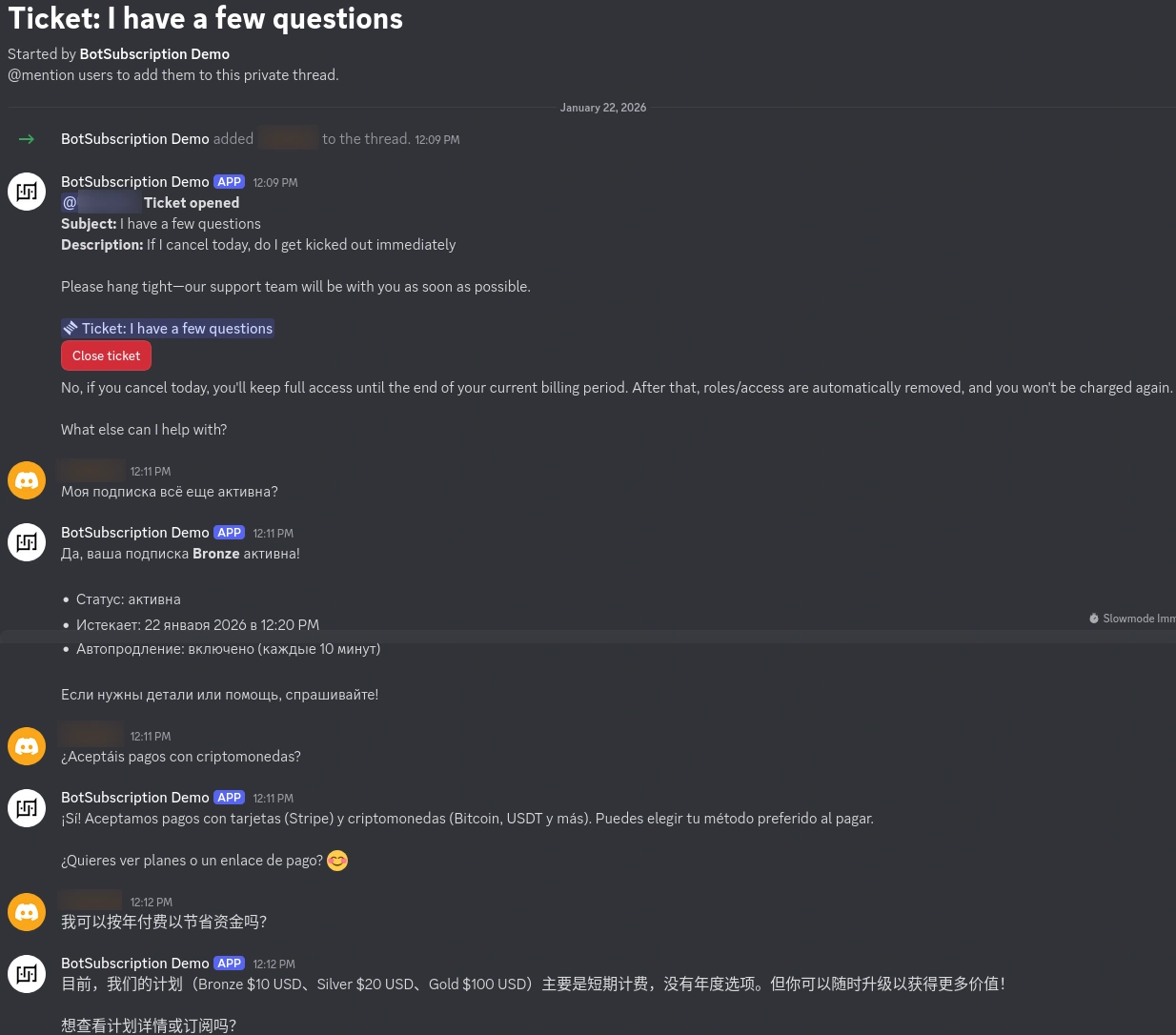
One of the most powerful features of the AI Assistant is its ability to understand and reply in almost any language—even if your Knowledge Base is only in English.
In this example, we see the bot handling questions in English, Russian, Spanish, Chinese, and Arabic—demonstrating context, account checks, and plan upgrades across multiple languages. The AI correctly adapts its answers and uses project tools regardless of the language used.
Common issues
The AI Assistant isn't replying
- AI Assistant add-on isn't active: confirm the add-on is installed and enabled.
- AI Assistant is disabled: open
/settings→ AI Assistant and enable it.
Answers are generic or off-brand
- Add more Knowledge Base entries for your most common questions.
- Tighten your Core Directive to better match your policies.
FAQ
Do I need to train the AI in every language my members use?
No. Training in multiple languages can help, but it’s optional. The AI can respond in multiple languages even without language-specific training.
Last updated: