Create a Subscription Plan
Subscription plans are the foundation of BotSubscription. Each plan defines what members pay, how long their access lasts, and which targets (roles, channels, or groups) they receive. This guide walks you through creating your first plan.
Before You Start
Make sure you have:
- Added the BotSubscription bot to your platform (Discord setup)
- Administrative access to manage the bot
- Created at least one target to assign to subscribers (e.g., a "Premium Member" role)
Step 1: Open the Settings Menu
Run the /settings command to open the bot's admin settings menu.
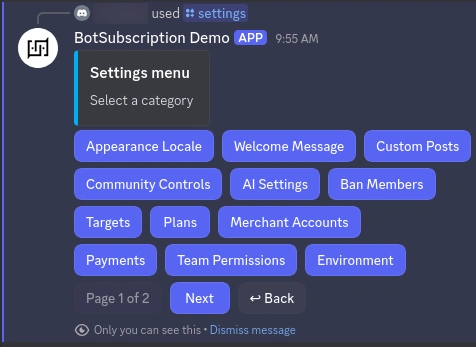
Click "Plans" to access plan management.
Step 2: Access Plan Management
After clicking Plans, you'll see the plan management screen with two options:
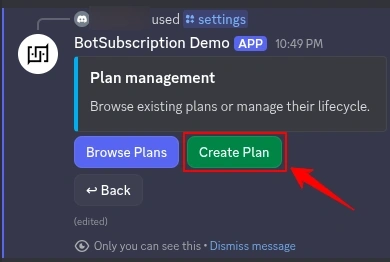
- Browse Plans - View and edit existing subscription plans
- Create Plan - Set up a new subscription plan
Click "Create Plan" to start building your first plan.
Step 3: Fill Out the Plan Details
A form appears asking for your plan details. Each field is required:
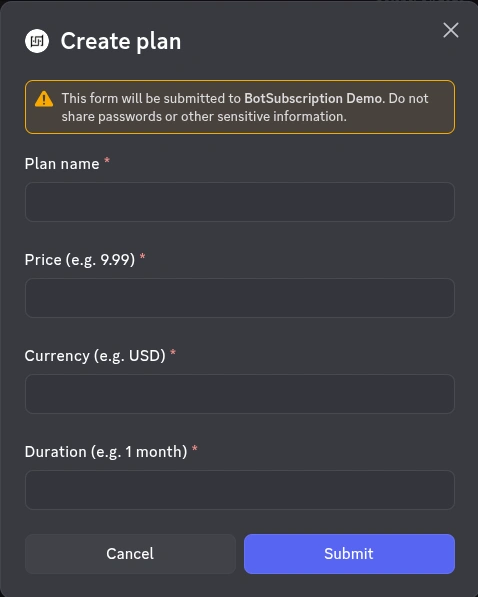
Plan Name
Choose a clear, descriptive name that tells members what they're getting:
- "Premium Monthly"
- "VIP Access"
- "Gold Tier"
- "Pro Subscription"
Keep plan names short and memorable. The bot displays the name alongside the price and duration, so avoid including pricing in the name itself.
Price
Enter the subscription price as a number:
- Whole numbers:
10,25,100 - Decimals:
9.99,19.50,4.99 - Crypto prices:
0.001,0.00025,0.00001234(up to 8+ decimal places for cryptocurrencies)
Currency
Enter a three-letter currency code. Common examples:
| Code | Currency | Type |
|---|---|---|
| USD | US Dollar | Fiat |
| EUR | Euro | Fiat |
| GBP | British Pound | Fiat |
| BTC | Bitcoin | Crypto |
| SOL | Solana | Crypto |
| USDT | Tether USD | Crypto |
View all supported currencies
Fiat Currencies:
| Code | Currency |
|---|---|
| AED | United Arab Emirates Dirham |
| AFN | Afghan Afghani |
| ALL | Albanian Lek |
| AMD | Armenian Dram |
| ARS | Argentine Peso |
| AUD | Australian Dollar |
| AZN | Azerbaijani Manat |
| BAM | Bosnia & Herzegovina Convertible Mark |
| BDT | Bangladeshi Taka |
| BIF | Burundian Franc |
| BND | Brunei Dollar |
| BOB | Bolivian Boliviano |
| BRL | Brazilian Real |
| CAD | Canadian Dollar |
| CHF | Swiss Franc |
| CLP | Chilean Peso |
| CNY | Chinese Renminbi Yuan |
| COP | Colombian Peso |
| CRC | Costa Rican Colón |
| CZK | Czech Koruna |
| DKK | Danish Krone |
| DOP | Dominican Peso |
| DZD | Algerian Dinar |
| EGP | Egyptian Pound |
| EUR | Euro |
| GBP | British Pound |
| GEL | Georgian Lari |
| GHS | Ghanaian Cedi |
| GMD | Gambian Dalasi |
| GNF | Guinean Franc |
| GTQ | Guatemalan Quetzal |
| HKD | Hong Kong Dollar |
| HNL | Honduran Lempira |
| HRK | Croatian Kuna |
| HUF | Hungarian Forint |
| IDR | Indonesian Rupiah |
| ILS | Israeli New Sheqel |
| INR | Indian Rupee |
| ISK | Icelandic Króna |
| JMD | Jamaican Dollar |
| JPY | Japanese Yen |
| KES | Kenyan Shilling |
| KGS | Kyrgyzstani Som |
| KRW | South Korean Won |
| KZT | Kazakhstani Tenge |
| LBP | Lebanese Pound |
| LKR | Sri Lankan Rupee |
| MAD | Moroccan Dirham |
| MDL | Moldovan Leu |
| MNT | Mongolian Tögrög |
| MUR | Mauritian Rupee |
| MVR | Maldivian Rufiyaa |
| MXN | Mexican Peso |
| MYR | Malaysian Ringgit |
| MZN | Mozambican Metical |
| NGN | Nigerian Naira |
| NIO | Nicaraguan Córdoba |
| NOK | Norwegian Krone |
| NPR | Nepalese Rupee |
| NZD | New Zealand Dollar |
| PAB | Panamanian Balboa |
| PEN | Peruvian Nuevo Sol |
| PHP | Philippine Peso |
| PKR | Pakistani Rupee |
| PLN | Polish Złoty |
| PYG | Paraguayan Guaraní |
| QAR | Qatari Riyal |
| RON | Romanian Leu |
| RSD | Serbian Dinar |
| RUB | Russian Ruble |
| SAR | Saudi Riyal |
| SEK | Swedish Krona |
| SGD | Singapore Dollar |
| THB | Thai Baht |
| TJS | Tajikistani Somoni |
| TRY | Turkish Lira |
| TTD | Trinidad and Tobago Dollar |
| TWD | New Taiwan Dollar |
| TZS | Tanzanian Shilling |
| UAH | Ukrainian Hryvnia |
| UGX | Ugandan Shilling |
| USD | United States Dollar |
| UYU | Uruguayan Peso |
| UZS | Uzbekistani Som |
| VND | Vietnamese Đồng |
| YER | Yemeni Rial |
| ZAR | South African Rand |
Cryptocurrencies:
| Code | Currency |
|---|---|
| BTC | Bitcoin |
| ETH | Ethereum |
| SOL | Solana |
| USDT | Tether USD |
| XRP | XRP |
| XTR | Telegram Stars |
Duration
Specify how long the subscription lasts using these formats:
| Unit | Examples | Use Case |
|---|---|---|
| Minutes | 30 minutes, 45 minutes | Short trials |
| Hours | 1 hour, 12 hours, 24 hours | Time-limited access |
| Days | 1 day, 7 days, 14 days, 30 days | Daily/weekly plans |
| Weeks | 1 week, 2 weeks, 4 weeks | Weekly billing |
| Months | 1 month, 3 months, 6 months | Standard subscriptions |
| Years | 1 year, 2 years | Annual plans |
| Lifetime | lifetime | One-time purchase, permanent access |
| Fixed date | 2025-12-31 (YYYY-MM-DD) | Seasonal access, limited events |
Here's an example of a completed form:
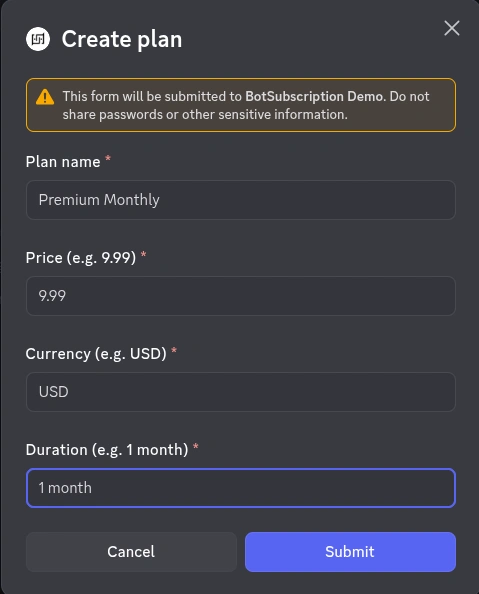
Click Submit to create the plan.
Step 4: Assign Targets to Your Plan
After creating the plan, the bot asks which targets to assign to subscribers:
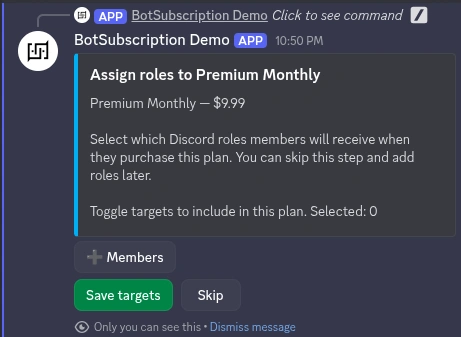
This screen shows:
- Plan name and price - Confirms which plan you're configuring
- Toggle targets - Click target buttons to include or exclude them
- Selected count - Shows how many targets are currently selected
Click a target button to toggle it. Selected targets show a checkmark:
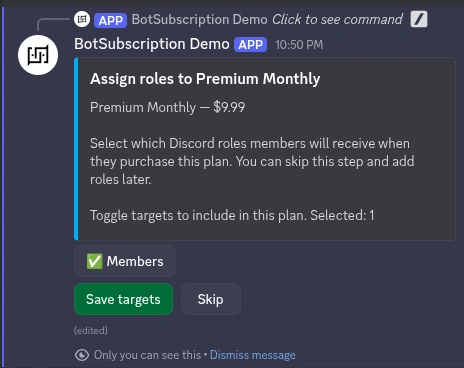
You can:
- Save targets - Confirm your selection and finish setup
- Skip - Skip target assignment for now (you can add targets later through Targets settings)
You can assign multiple targets to a single plan. This is useful for tiered systems where higher plans include all lower-tier benefits.
Step 5: Confirm Plan Creation
After saving your targets, you'll see a confirmation message:

The message confirms:
- Plan name
- Number of targets linked
Your plan is now live. Members can purchase it through the bot or web dashboard. For a detailed walkthrough of the subscriber experience, see the subscription flow guide.
Creating Multiple Plans
Most communities benefit from multiple subscription tiers. Common structures include:
Duration-Based Tiers
| Plan | Price | Duration |
|---|---|---|
| Monthly | $9.99 | 1 month |
| Quarterly | $24.99 | 3 months |
| Annual | $79.99 | 1 year |
Access-Level Tiers
| Plan | Price | Access Level |
|---|---|---|
| Bronze | $4.99/mo | Basic Member |
| Silver | $9.99/mo | Premium Member |
| Gold | $19.99/mo | VIP Member |
Offer a discount for longer commitments. Annual plans at 30-40% off monthly pricing encourage longer subscriptions and reduce churn.
Managing Existing Plans
To edit or delete plans:
- Run
/settingsand click Plans - Click Browse Plans to see all your plans
- Select a plan to view its details
- Use the available options to edit settings or delete the plan
Next Steps
Now that you've created your first subscription plan:
Last updated: