NowPayments Crypto Payment Setup
NowPayments is a cryptocurrency payment gateway that allows your subscription bot to accept Bitcoin, Ethereum, and 200+ other cryptocurrencies. This setup guide walks you through the complete NowPayments integration process. Subscribers pay with crypto, and you can receive funds in crypto or have them auto-converted to stablecoins.
Why NowPayments?
- 200+ cryptocurrencies - Accept Bitcoin, Ethereum, USDT, and many more
- No KYC for subscribers - Privacy-friendly payments
- Auto-conversion - Convert received crypto to stablecoins automatically
- Global reach - Accept payments from anywhere in the world
- Low processing fees - NowPayments charges 0.5-1% per transaction (separate from BotSubscription fees)
NowPayments is ideal for subscription bots serving crypto-native audiences or subscribers who prefer privacy-focused payment methods.
Prerequisites
Before connecting NowPayments to your subscription bot, you'll need:
- A NowPayments account (Sign up here)
- Your API Key from the NowPayments dashboard
- Your IPN Secret Key for payment notifications
Getting Your NowPayments Credentials
- Log in to your NowPayments dashboard
- Navigate to Settings > API Keys
- Copy your API Key
- Go to Settings > IPN (Instant Payment Notification)
- Copy your IPN Secret Key
Keep your API Key and IPN Secret Key secure. Never share them publicly.
Connecting NowPayments
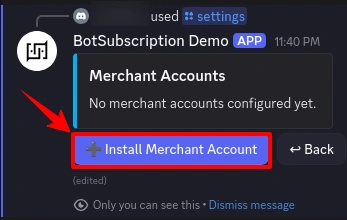
Open the bot settings using the /settings command and navigate to "Merchant Accounts".
Step 1: Install Merchant Account
Click "Install Merchant Account" to add a new payment provider.
Step 2: Select NowPayments
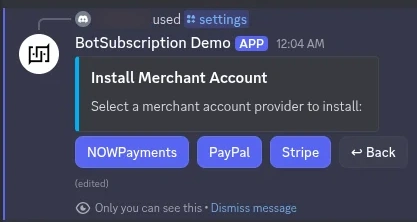
Choose "NOWPayments" from the list of available payment providers.
Step 3: Review Requirements
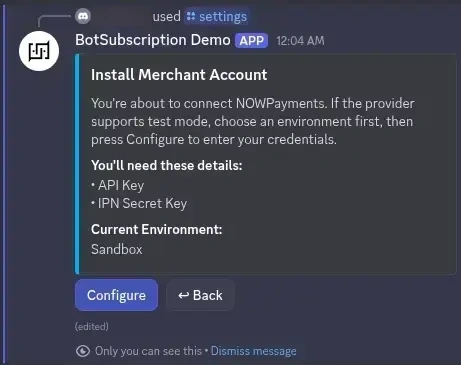
The bot displays what credentials you'll need:
- API Key - Your NowPayments API key
- IPN Secret Key - For secure payment notifications
The current environment is shown (Sandbox for testing, or Production for live payments). Click "Configure" to proceed.
Step 4: Enter Your Credentials
A secure form appears where you enter your NowPayments credentials:
- Paste your API Key from the NowPayments dashboard
- Paste your IPN Secret Key from the NowPayments IPN settings
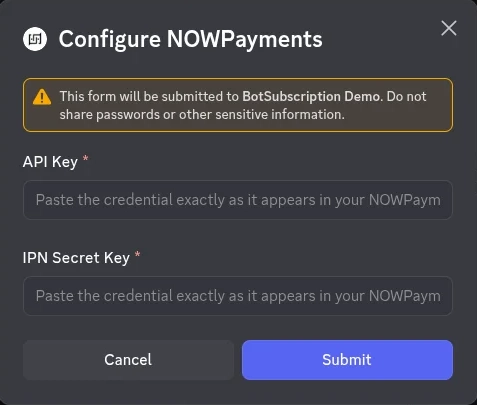
Click "Submit" to complete the setup.
Step 5: Confirmation
Once validated, you'll see a success message confirming that NowPayments has been connected.
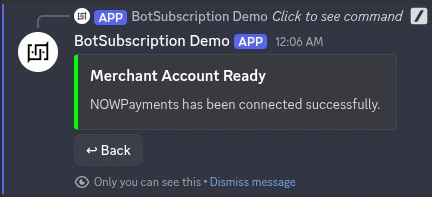
Your subscribers can now pay for subscriptions using cryptocurrency.
Supported Cryptocurrencies
NowPayments supports 200+ cryptocurrencies. The most popular options include:
| Currency | Symbol | Network |
|---|---|---|
| Bitcoin | BTC | Bitcoin |
| Ethereum | ETH | Ethereum |
| Tether | USDT | Ethereum, Tron, BSC |
| USD Coin | USDC | Ethereum, Solana |
| Litecoin | LTC | Litecoin |
| Solana | SOL | Solana |
| Dogecoin | DOGE | Dogecoin |
| Polygon | MATIC | Polygon |
| BNB | BNB | BNB Chain |
Subscribers choose their preferred cryptocurrency at checkout.
Environment Modes
Sandbox (Testing)
Use Sandbox mode to test your integration without processing real payments:
- Test transactions don't involve real cryptocurrency
- Verify your setup works before going live
- No actual funds are transferred
- Payments auto-settle within 120 seconds - No need to send real crypto
In Sandbox mode, simply create a payment and wait up to 2 minutes. The payment will automatically be marked as completed, allowing you to test the full subscription flow including role assignment and access grants.
Production (Live)
Switch to Production mode when you're ready to accept real payments:
- Real cryptocurrency transactions
- Actual funds deposited to your account
- Full payment processing
- Members must send actual cryptocurrency to complete payment
Always test in Sandbox mode first to ensure everything works correctly before enabling Production mode.
Minimum Payment Amounts
Some cryptocurrencies have minimum transaction amounts set by NOWPayments. If your subscription plan price is below the minimum for a particular coin, members will see an error message.
Last updated: