Revolut payment setup for your subscription bot on Telegram & Discord
If you run a subscription bot on Telegram or Discord, Revolut gives your members a secure checkout experience while you receive funds directly to your Revolut Business account.
Revolut is a strong fit when your audience already uses Revolut and you want to reduce checkout friction with a familiar provider.
As a general guideline as of January 2026, Revolut personal accounts are available in 40+ countries (primarily the EEA and UK, plus the US, Australia, Brazil, Japan, New Zealand, Singapore, Switzerland, and select territories). Revolut Business availability is more restrictive and commonly depends on where your company is registered (often the UK/EEA, and sometimes the US) and where the applicant resides. Availability can change with local regulations, so always confirm eligibility directly with Revolut before you build pricing around it.
This guide shows you how to connect Revolut in BotSubscription so your bot can offer Revolut as a payment provider during checkout.
Why use Revolut with your Discord payment bot?
- Direct payouts: Funds go directly to your Revolut Business account (BotSubscription does not hold your money).
- Works across platforms: Use one setup for members subscribing via Telegram chats and Discord servers.
- Great regional option: Useful when your audience prefers Revolut or when other processors are limited in your region.
Prerequisites for Revolut setup
Before you connect Revolut, make sure you have:
- A Revolut Business account. Use the Revolut Business signup page if you don’t already have one.
- Your Revolut API keys (Public Key and Secret Key).
- Admin access to your bot’s settings (you’ll use the
/settingscommand).
Connect Revolut to your Telegram & Discord subscription bot
Step 1: Open Merchant Accounts in Settings
In Telegram or Discord, open your bot’s Settings, then navigate to Merchant Accounts.
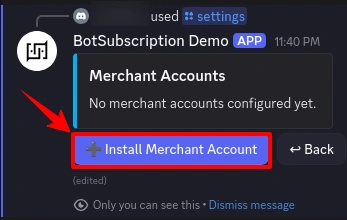
Step 2: Install a merchant account
Select Install Merchant Account to add a new provider.
Step 3: Select Revolut
Choose Revolut from the available payment providers list.
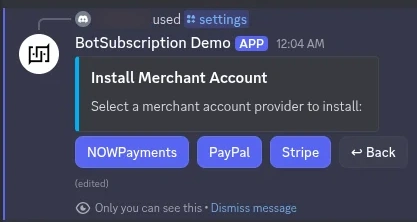
Step 4: Review the required Revolut credentials
BotSubscription will show which credentials you need to provide:
- Revolut Public Key
- Revolut Secret Key
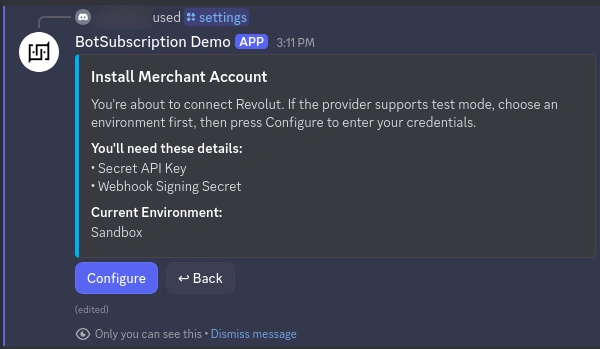
For payment providers that support test mode, BotSubscription lets you install merchant accounts separately for Sandbox and Production, so you can test without charging real money. See Sandbox vs Production environments.
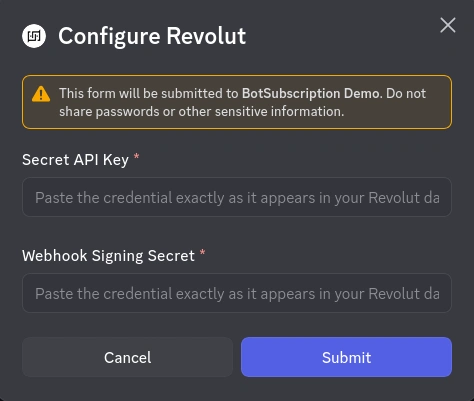
Step 5: Paste your Revolut Public Key and Secret Key
Open your Revolut Business dashboard and locate your Merchant API keys.
- Merchant API settings: open Revolut Merchant API settings
Copy the Public Key and Secret Key, then paste them into the BotSubscription configuration form and click Submit.
Step 6: Confirm Revolut is connected
After BotSubscription validates your keys, you’ll see a success confirmation.
At this point, members will see Revolut as an option when they subscribe and pay.
Common issues
Revolut is not showing up for members
- Make sure Revolut is installed and active in Merchant Accounts.
- Confirm your bot is in the right environment (Sandbox vs Production), because the bot only shows payment providers for the active environment. See how environments affect payment providers.
“Invalid key” or “Authentication failed”
- Double-check that you copied the Public Key and Secret Key (no extra spaces).
- Confirm you didn’t swap them: paste the Public Key into the Public Key field, and the Secret Key into the Secret Key field.
- Make sure you used the keys that match your environment (Sandbox keys for Sandbox, Production keys for Production).
FAQ
Do I need Revolut Business (not a personal account)?
Yes. You’ll need a Revolut Business account to access Merchant API credentials used for the integration.
Can I connect Revolut alongside Stripe or PayPal?
Yes. Many creators offer multiple payment providers so members can choose what’s easiest. You can also set up Stripe payments for your subscription bot or PayPal payments for Telegram and Discord subscriptions.
Can I test Revolut before going live?
If your Revolut account provides Sandbox keys, install Revolut as a Sandbox merchant account first, test the flow, then repeat the setup in Production.
Next steps
Last updated: