Save Payment Methods (Vaulting)
For a subscription bot to charge users automatically each month, it needs permission to store their payment details securely. In PayPal, this capability is called Save Payment Methods (historically known as "Vaulting").
When enabled, BotSubscription stores a secure token representing the user's payment method—not the card or bank details themselves. This allows for seamless recurring billing without asking the user to log in or re-enter data every billing cycle.
Prerequisites
Before you can use this feature, your PayPal account requires specific permissions. This is a security measure by PayPal to prevent unauthorized charges.
- Save Payment Methods: This is the core permission required on your Business Account.
- Advanced Card Processing: If you intend to save credit/debit cards directly (without the user logging into a PayPal wallet), you will also need this feature enabled.
Step 1: Enable Saving in Your Account
This feature is not active by default on new PayPal Business accounts. You must request it from your account settings.
- Log in to your PayPal Business dashboard.
- Click on your profile name or the gear icon, then select Account Settings.
- In the left sidebar, choose Payment preferences.
- Look for the line item labeled Save PayPal and Venmo payment methods.
- Click Get Started (or Configure if you have enabled this before).
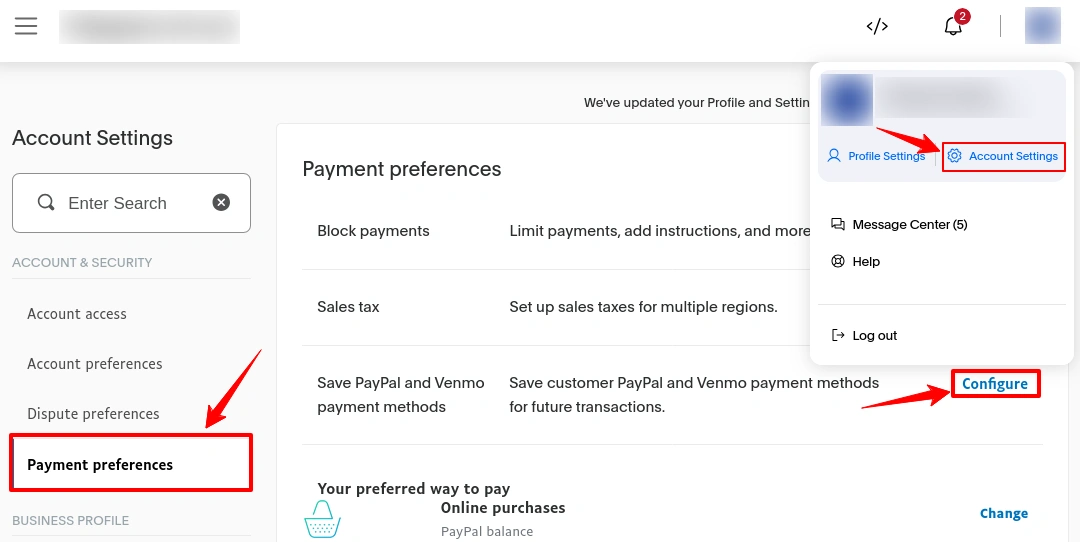 Caption: Requesting permission to save payment methods in PayPal Account Settings.
If you see a "Contact Us" button instead of "Get Started", you may need to speak with PayPal support to have this feature manually enabled. PayPal typically requires a short history of healthy transaction volume before granting this access.
Step 2: Configure Your App Capabilities
Once your business account is approved for saving payment methods, you need to tell your specific BotSubscription application to use it.
- Open the PayPal Developer Dashboard.
- Go to Apps & Credentials and ensure you are on the Live tab (for testing, see Sandbox vs Production).
- Select the app you have created for your bot.
- Scroll down to the section titled Payment capabilities.
- Find the checkbox for Save payment methods (you might still see it referred to as "Vault" in some documentation).
- Check the box to enable it and Save Application.
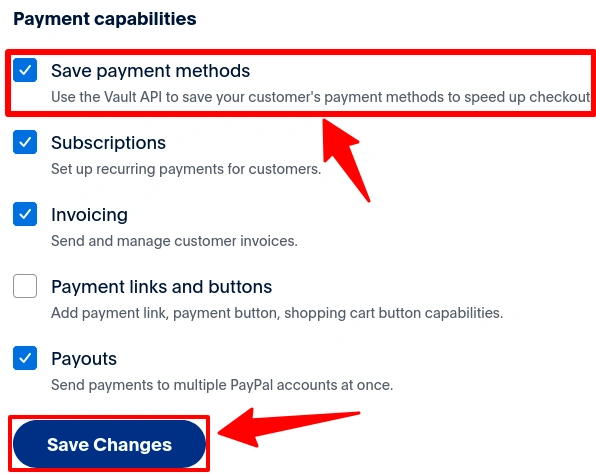 Caption: Enabling the "Save payment methods" capability is required for recurring subscriptions.
If you cannot check the Save payment methods box (it appears grayed out), it usually means the saving permission from Step 1 has not yet been fully approved on your main account.
Why use Save Payment Methods?
While BotSubscription is intelligent enough to fall back to standard recurring profiles if this feature is unavailable, enabling Save Payment Methods is highly recommended for the best experience.
Using native saving (Vaulting) gives you:
- Higher Reliability: Tokenized payments often have higher success rates than standard recurring profiles.
- Detailed Control: Allows for seamless plan upgrades or one-off purchases without re-entering details.
- Frictionless Renewals: Ensures the smoothest possible experience for your subscribers.
Known Limitations
- Pay Later Availability: Enabling vaulting can sometimes hide "Pay Later" options (like PayPal Credit) at checkout, as these methods are not always compatible with recurring billing tokens.
- Approval Delays: New accounts might face a waiting period before PayPal grants access to this feature.
Last updated: